Choosing the right live video camera streaming setup can feel confusing because almost every camera now claims to be good enough for creators. A webcam looks simple. A smartphone looks practical. A mirrorless camera looks professional. Then there are PTZ cameras, action cameras, camcorders, and DSLR-style setups that make the decision feel even heavier.
The best choice is not always the most expensive camera. It depends on what kind of live stream you run, how often you go live, where you stream from, and whether you need close-up talking, product demos, teaching sessions, interviews, events, or multi-camera coverage.
For Top Livestream Sound of Text, this topic belongs in the Cameras category because the camera is one of the first upgrades people notice. Better audio is still important, but video clarity, framing, focus, lighting response, and connection stability can quickly change how professional a live broadcast feels.
Camera Choice Should Match The Type Of Stream

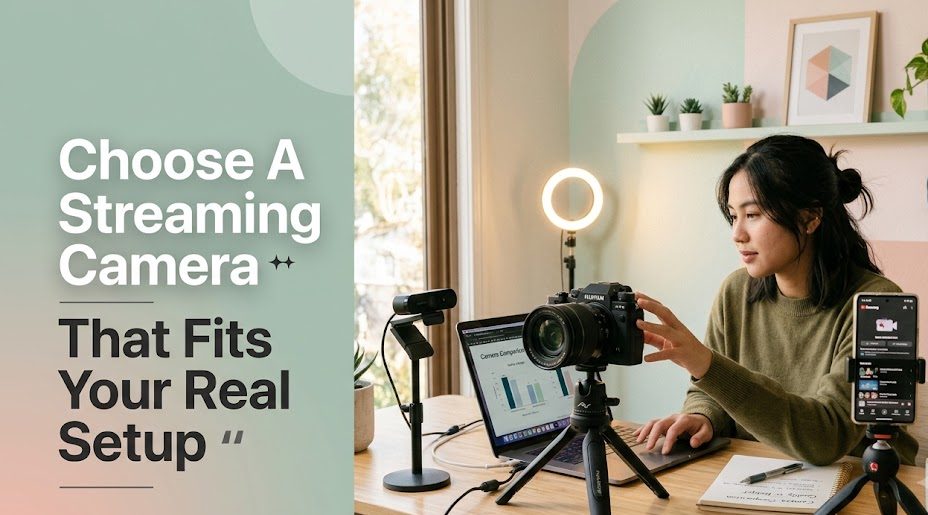
A camera that works well for a desk-based creator may not be the right camera for a church event, music session, cooking show, online class, or product demo. This is where many beginners spend too much. They buy a camera because it looks popular, not because it fits the stream.
Before choosing, think about:
- where the camera will be placed
- whether the host moves around
- how long the live session usually lasts
- whether the stream needs close-up details
- whether the lighting is controlled
- whether the camera must connect directly to a computer
- whether the setup should stay permanent or be portable
A simple webcam can be excellent for a creator who sits at a desk. A mirrorless camera can look better for a polished studio. A PTZ camera can make more sense for rooms, events, or stages. The right live video camera streaming setup starts with the use case, not the price tag.
Quick Comparison Of Live Streaming Camera Options
| Camera Option | Best For | Main Strength | Possible Weakness |
|---|---|---|---|
| Webcam | Beginners, meetings, desk streams | Simple and affordable | Limited lens control |
| Smartphone | Mobile creators, casual lives | Convenient and portable | Battery and heat limits |
| Mirrorless camera | Professional creators, studios | Strong image quality | Needs more setup |
| DSLR camera | Creators who already own one | Good lens options | Some models are less stream-friendly |
| Camcorder | Long live sessions and events | Reliable continuous recording | Less cinematic look |
| PTZ camera | Churches, classes, conferences | Remote movement and room coverage | Higher setup cost |
| Action camera | Outdoor, travel, sports content | Wide view and portability | Not ideal for face-focused streams |
This table keeps the decision realistic. A camera is not “best” in every situation. It is only best when it solves the actual streaming problem.
1. Webcam For Simple Desk-Based Streaming
A webcam is still one of the easiest live streaming camera options for beginners. It connects directly to a computer, works with most streaming platforms, and usually needs less technical setup than bigger cameras.
This is a strong choice for:
- online meetings
- beginner livestreams
- webinars
- podcast-style video
- remote teaching
- screen-sharing sessions
- simple creator updates
A webcam works best when the host sits in one place and does not need dramatic background blur or advanced lens control. It is also practical for people who need a clean setup without extra capture cards, dummy batteries, or complicated cables.
The biggest mistake is expecting a webcam to fix poor lighting. Even a good webcam can look dull in a dark room. A basic soft light placed in front of the host can improve the result more than buying a more expensive webcam too early.
For many beginners, a webcam is the most reasonable first step because it keeps the streaming camera setup simple.
2. Smartphone Camera For Flexible Live Sessions
A smartphone can be a surprisingly strong choice for live video camera streaming, especially for creators who already have a phone with a good camera. It is portable, familiar, and easy to use for vertical live sessions on platforms like TikTok, Instagram, YouTube Shorts-style lives, or mobile-first communities.
A smartphone works well for:
- casual creator lives
- live shopping
- behind-the-scenes content
- travel streams
- food content
- mobile interviews
- quick updates
- community check-ins
The strength of a smartphone is convenience. The creator can start quickly without building a full studio. The camera quality on modern phones is often good enough for social livestreams, especially when the lighting is clean.
But there are limits. Long live sessions can drain battery, create heat, and make the phone harder to use for chat, notes, or monitoring. A phone also needs stable placement. Holding it by hand for a full session can make the video shaky and tiring to watch.
A better smartphone streaming setup usually includes:
- tripod or phone mount
- charging cable or power bank
- external microphone
- stable Wi-Fi or mobile data
- simple front lighting
- clean background
For mobile creators, the phone may be the most practical camera before buying anything else.
3. Mirrorless Camera For A More Professional Studio Look
A mirrorless camera is often the upgrade people imagine when they want their livestream to look more professional. It can provide better image quality, stronger low-light performance, lens flexibility, and a more polished background look.
This option fits:
- professional creators
- online educators
- coaches
- product reviewers
- interview hosts
- studio streamers
- brand livestreams
- high-quality webinars
A mirrorless camera can make the host look sharper and more separated from the background. It also gives more control over lens choice, framing, exposure, and depth of field.
However, this setup is not as simple as plugging in a webcam. Depending on the camera model, the creator may need HDMI output, a capture card, clean HDMI mode, external power, and proper heat management. Some cameras also have recording or overheating limits, even if they look excellent.
This type of camera is worth considering when the creator already streams regularly and wants the live streaming video quality to feel closer to a studio production.
4. DSLR Camera For Creators Who Already Own One
A DSLR can still work for streaming, especially if the creator already owns one. Many DSLRs have good sensors, interchangeable lenses, and strong image quality. For people who bought a DSLR for photography, using it for live streaming can be a smart way to avoid buying another camera too soon.
A DSLR may suit:
- creators who already own camera gear
- talking-head livestreams
- product demos
- photography educators
- studio-based sessions
- recorded-and-live hybrid content
The key is compatibility. Not every DSLR is easy to use for live streaming. Some older models may lack clean HDMI output, may not connect smoothly as a webcam, or may have battery and heat issues during long sessions.
Before building around a DSLR, check:
- whether it supports clean HDMI
- whether it can stay powered continuously
- whether it has autofocus that works well for video
- whether it overheats during long use
- whether it needs a capture card
- whether it can output the right resolution
A DSLR can produce a beautiful image, but it should not make the live setup fragile. If the camera needs too many workarounds, a modern webcam or mirrorless camera may be easier.
5. Camcorder For Long Live Events
A camcorder may not look as trendy as a mirrorless camera, but it can be one of the most practical options for long live sessions. Camcorders are built around video first, which makes them useful for events, lectures, religious services, conferences, training rooms, and long-form broadcasts.
A camcorder works well for:
- school events
- church livestreams
- seminars
- public talks
- local performances
- training sessions
- long webinars
- indoor event coverage
The main advantage is reliability. Camcorders often handle longer recording or streaming sessions better than cameras designed mainly for photography. They usually offer useful zoom ranges, steady handling, and fewer worries about lens swapping.
The tradeoff is style. A camcorder may not give the same cinematic background blur as a mirrorless camera. But for live events, clarity and reliability often matter more than a dramatic look.
For teams that stream long sessions regularly, a camcorder can be more sensible than trying to force a photo camera into an event role.
6. PTZ Camera For Rooms, Stages, And Multi-Angle Coverage
A PTZ camera stands for pan, tilt, and zoom. It is designed to move remotely, which makes it useful for spaces where one camera needs to cover different angles without a camera operator standing beside it.
PTZ cameras are useful for:
- churches
- classrooms
- conference rooms
- city council meetings
- training halls
- hybrid events
- stage performances
- panel discussions
This option is not usually the first choice for a beginner creator sitting at a desk. It is better for fixed spaces and organizations that need repeatable live coverage.
The biggest strength is control. A PTZ camera can move from a wide room shot to a speaker close-up. Some setups can save preset angles, making the stream easier to manage during events.
The downside is cost and setup. PTZ cameras often need more planning, mounting, cabling, control software, and sometimes network configuration. But for teams that stream from the same room every week, the investment can make sense.
7. Action Camera For Outdoor And Movement-Based Streams
An action camera is not the best option for every live stream, but it can be useful when the content involves movement, travel, outdoor scenes, sports, or compact placement.
It fits:
- outdoor creators
- travel livestreams
- sports content
- bike or walking streams
- behind-the-scenes views
- compact desk angles
- wide room shots
- event backup angles
The wide-angle view can make the scene feel active and immersive. It can also fit into places where a larger camera would be awkward.
But action cameras are not always flattering for face-focused streams. The wide lens can distort the face if placed too close. Some models may also struggle in low light compared with larger cameras.
For creators who move a lot, an action camera can be useful. For creators who mainly sit and speak to the camera, it is usually not the first recommendation.
How To Choose Without Overbuying
The safest way to choose a camera is to start from the stream format.
If the stream is mostly talking at a desk, start with a good webcam or smartphone. If the stream is brand-focused and polished, consider a mirrorless camera. If the stream runs for hours, consider a camcorder. If the stream covers a room or stage, consider a PTZ camera. If the stream happens outdoors or in motion, consider an action camera.
A simple decision path looks like this:
| Streaming Need | Better Camera Direction |
|---|---|
| Beginner talking-head stream | Webcam |
| Mobile social livestream | Smartphone |
| Studio-quality creator stream | Mirrorless camera |
| Existing camera owner | DSLR, if compatible |
| Long event coverage | Camcorder |
| Room or stage coverage | PTZ camera |
| Outdoor movement stream | Action camera |
This keeps the choice grounded. A camera upgrade should solve a real problem, not just make the setup look expensive.
Camera Quality Still Depends On Lighting And Audio
A better camera will not save a stream with bad lighting, messy framing, or poor sound. Viewers may forgive average video more easily than distorted audio, but they still notice when the image is dark, shaky, or badly framed.
Before buying a camera, creators should improve the basics:
- place the camera at eye level
- face a soft light source
- avoid strong backlight
- clean the background
- use stable mounting
- frame the subject with enough headroom
- test focus before going live
- use an external microphone if possible
A cheaper camera with good lighting can look better than an expensive camera in a dark room. This is why live video camera streaming should be planned as a full setup, not a single purchase.
The Best Camera Is The One That Fits The Stream
There is no single best camera for every livestream. A webcam can be the smartest choice for a beginner. A smartphone can be enough for mobile creators. A mirrorless camera can raise the production value for studio content. A camcorder can handle long events. A PTZ camera can support rooms and stages. An action camera can capture movement and outdoor scenes.
The right choice depends on the kind of live content being produced, how often it happens, and how much setup the creator can manage without stress.
A good camera should make the stream clearer, not more complicated. For most creators, the best upgrade is the one that improves the broadcast while still fitting the real workflow.

Elodie Marceau is a former audiovisual technician who worked with small studios, cultural organizations, and independent production teams. She has practical experience with cameras, microphones, mixers, lighting equipment, capture cards, encoders, and livestream software. Her reviews focus on how equipment performs in realistic working environments, including small rooms, temporary studios, mobile setups, and limited-budget productions.